
THE OPERATING CENTRE FOR YOUR SCHOOL
See the whole school.
Move it forward.
The ATBIX school management panel brings admissions, student records, attendance, fees, academics, transport, staff, communication and reporting into one clear command centre, built for the scale and rhythm of Indian schools.
FOR PRINCIPALSFOR ADMINISTRATORSFOR SCHOOL GROUPS
ATBIX SCHOOL COMMAND CENTRE
94%Attendance today
12 insights ready
LIVE OPERATING PICTURE01
ONE SCHOOL · ONE PICTURE
A school ERP dashboard should do more than store information.
It should help leadership understand the day, help teams complete work and help the institution act before small issues become urgent.
ATBIX is designed as an active school management environment: connected, role-aware and ready to surface what deserves attention.
for school data
access and actions
and exceptions
and early signals
INSIDE THE PANELA command centre
A command centre
clients can actually see.
Real product screens show how leadership visibility and daily administration come together inside ATBIX.
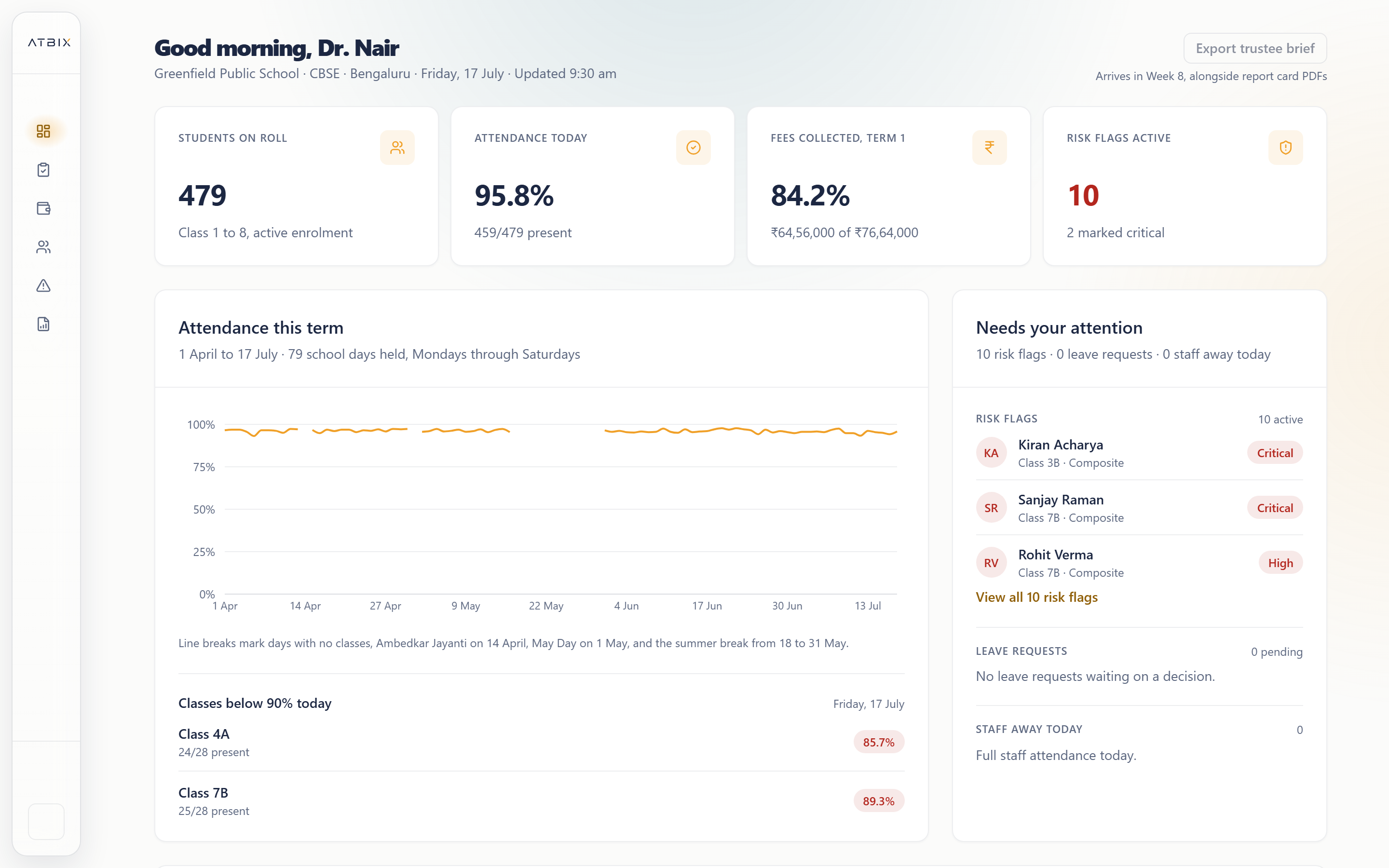
01 · LEADERSHIP VIEW
The whole school, organised into one operating picture.
Attendance, performance, fees and priority signals remain connected to the underlying school information.
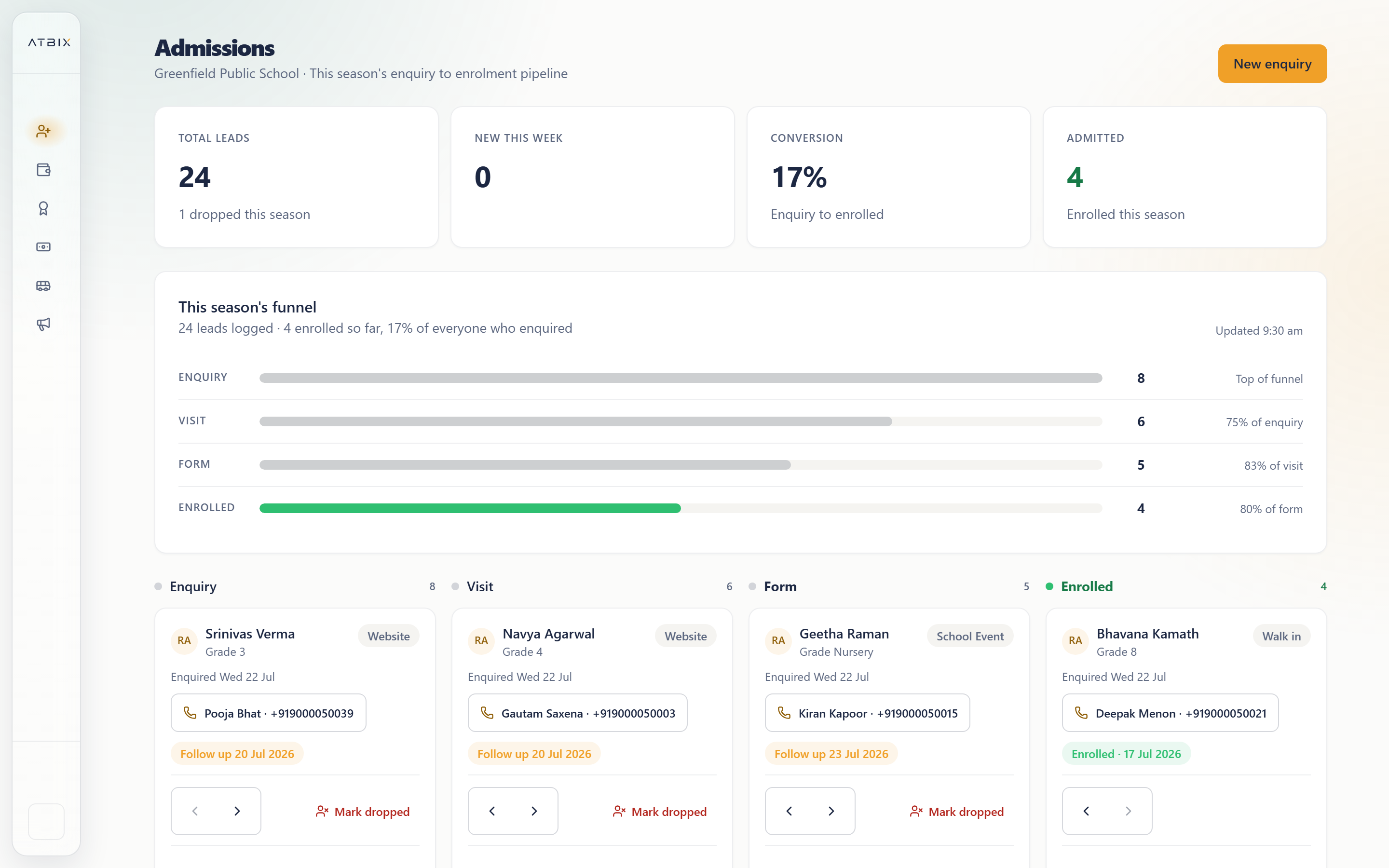
02 · ADMINISTRATION VIEW
Every application moves through a visible workflow.
Enquiries, documents, review and enrolment stay current across the admissions team.
Attendance visible without waiting for a report.
Applications organised by stage and next action.
Trusted source across leadership and administration.
THE PROBLEMS IT SOLVESLess fragmentation.
Less fragmentation.
Far more clarity.
ATBIX replaces operational gaps with connected school workflows and a dependable source of truth.
01
WITHOUT A CONNECTED PANEL
→Information is scattered
Attendance sits in one system, fees in another and important updates inside spreadsheets or message groups.
WITH ATBIX
ATBIX creates one current operating picture across the school.
02
WITHOUT A CONNECTED PANEL
→Reports arrive too late
Leadership teams often wait for manually prepared reports before they can see an issue or opportunity.
WITH ATBIX
Live dashboards and scheduled summaries make patterns visible earlier.
03
WITHOUT A CONNECTED PANEL
→Routine work is repeated
The same student, parent or staff information is entered, checked and shared by multiple departments.
WITH ATBIX
Connected workflows move trusted information between teams without repeated entry.
04
WITHOUT A CONNECTED PANEL
→Accountability is unclear
Approvals, follow-ups and exceptions disappear across conversations when no one can see the next owner.
WITH ATBIX
Role-based queues, statuses and histories keep responsibility visible.
YOUR SCHOOL · IN ONE CLEAR VIEWBring your leadership team
Bring your leadership team
into the command centre.
EVERYDAY USE CASESDesigned around
Designed around
real school moments.
From the first bus departure to the final leadership review, the panel keeps essential work visible and connected.
01Principal · Administrator
Morning operations
See attendance readiness, transport movement, staff availability and campus exceptions before the first period begins.
Discuss this workflow ↗02Finance · Leadership
Fee collection review
Understand collection progress, pending instalments, concessions and follow-up priorities without rebuilding a spreadsheet.
Discuss this workflow ↗03Admissions · Front office
Admissions pipeline
Track every enquiry and application from first interest through document review, approval and enrolment.
Discuss this workflow ↗04Academic leadership
Academic oversight
Review timetable health, homework publishing, assessment progress and student support signals across classes.
Discuss this workflow ↗05Office · Teachers
Parent communication
Send focused notices to the right families and maintain a dependable communication history for the school.
Discuss this workflow ↗06Director · School group
Multi-campus review
Compare campus performance while allowing each institution to manage its own people, workflows and priorities.
Discuss this workflow ↗FEATURE BREAKDOWNEverything inside the
Everything inside the
school management panel.
Use this table as the foundation for the final module and plan comparison.
| Capability | What it manages | Primary users | Availability |
|---|---|---|---|
| Executive dashboard | Live school overview | Principal, Director | All plans |
| Admissions management | Enquiry to enrolment workflow | Admissions, Office | All plans |
| Student information | Profiles, documents and academic history | Office, Teachers | All plans |
| Attendance management | Daily capture, exceptions and trends | Teachers, Leadership | All plans |
| Fees and collections | Structures, instalments, receipts and reports | Finance, Parents | All plans |
| Academic operations | Timetable, homework, assessment and progress | Academic team | All plans |
| Transport management | Routes, vehicles, stops and family updates | Transport, Parents | All plans |
| Staff and approvals | Records, leave and workflow approvals | HR, Leadership | Intelligence + |
| AI-powered insights | Summaries, patterns and recommended actions | Leadership | Intelligence + |
| Multi-campus control | Network overview with campus-level autonomy | Director, Group office | Network |
NEED A CUSTOM MODULE MIX?
Schools can begin with priority workflows and expand the platform in planned phases.
ROLE-BASED BY DESIGNThe same school.
The same school.
The right view for everyone.
Permissions and dashboards are configured around responsibility, protecting sensitive information while keeping work moving.
Founder & Director
Network performance, campus comparison, strategic trends and major operational priorities.
Principal
Daily school health, attendance, academics, staff, parent communication and exceptions.
Administration
Student records, workflows, documents, admissions, approvals and cross-team coordination.
Finance team
Fee structures, collection status, receipts, concessions, reconciliation and follow-ups.
Academic team
Timetables, assignments, assessments, progress and student support visibility.
Transport team
Routes, vehicles, stops, readiness, movement and dependable family updates.
FROM CURRENT SYSTEM TO ATBIXA guided move.
A guided move.
A confident launch.
Implementation combines discovery, configuration, migration, training and adoption planning.
- 01
Discover
Map structures, priorities, systems and ownership.
- 02
Configure
Set roles, modules, workflows and school rules.
- 03
Migrate
Prepare, validate and transfer agreed records.
- 04
Enable
Train every team around the experience they use.
- 05
Launch
Go live with focused support and clear ownership.
SCHOOL PANEL FAQQuestions leadership
Questions leadership
usually asks.
Clear answers about capability, fit, migration and implementation.
01What is a school management panel?+
A school management panel is the central administrative workspace used to manage student information, attendance, fees, admissions, academics, transport, staff, communication and reporting. ATBIX brings these areas into one role-based operating system.
02Who can use the ATBIX school panel?+
Access can be configured for founders, directors, principals, administrators, finance teams, admissions teams, academic coordinators, transport teams and other authorised staff. Each role sees only the information and actions appropriate to its responsibility.
03Can the panel support multiple campuses?+
Yes. ATBIX can provide a network-level view across campuses while allowing each school to maintain local workflows, roles, calendars, academic structures and operational autonomy.
04Does ATBIX replace our existing school ERP?+
ATBIX can become the primary school operating platform or be introduced in phases. The implementation approach depends on your current systems, data readiness, selected modules and preferred rollout plan.
05Can we migrate existing student and fee data?+
Yes. Migration is handled through a guided process that includes data mapping, preparation, validation and controlled import. The exact scope depends on the quality and format of the existing records.
06How does AI work inside the school panel?+
ATBIX Intelligence can help prepare summaries, surface patterns, identify exceptions, draft communication and suggest next actions. Authorised school teams remain responsible for reviewing and approving decisions.
07Is the school panel suitable for CBSE, ICSE and state board schools?+
The platform is designed to support configurable academic structures, terms, classes, sections and operational workflows. Final configuration is mapped during implementation around the institution's board and internal processes.
08How long does implementation take?+
A focused rollout can begin within weeks, while a complete multi-module or multi-campus implementation may take longer. Discovery, configuration, migration, training and launch planning are included in the implementation journey.